
Best AI Image Editing Models (As of October 2026): Real Benchmark, Quality & Cost Comparison
Comprehensive benchmark as of October 5, 2026 comparing top AI image editing models for text replacement and inpainting: GPT Image 2.5 Flare, Nano Banana Pro, Grok, Qwen 2, and Seedream. Real API costs, latency, and typography accuracy tested.
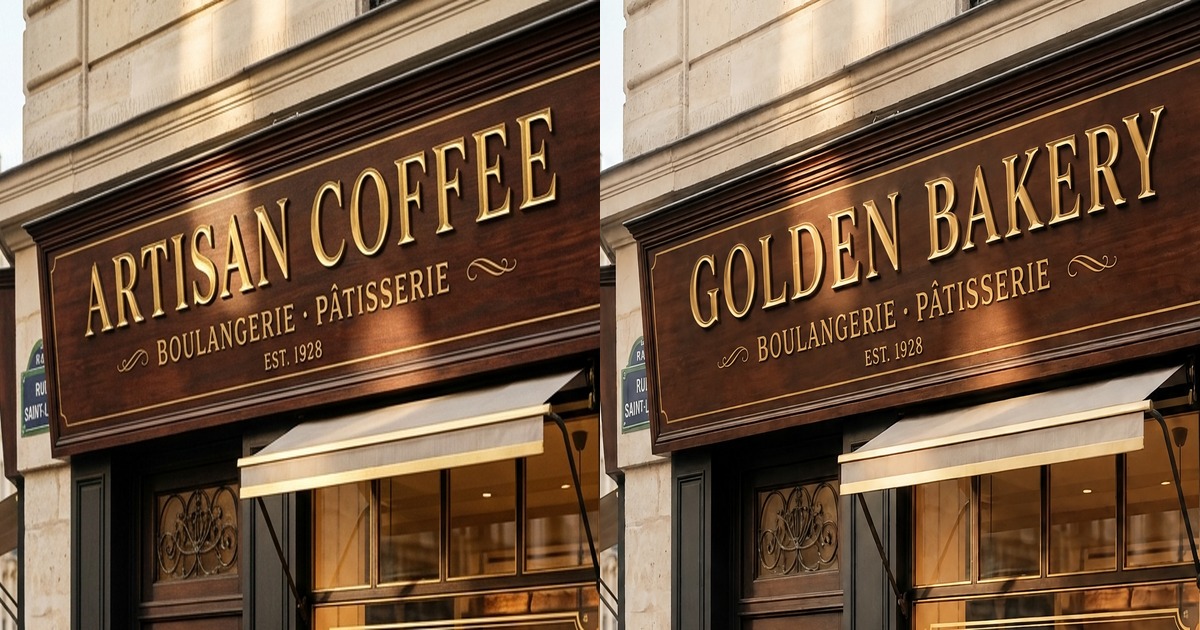
Finding the best AI image editing model in 2026 is no longer just about prompting a diffusion model to generate dreamy fantasy art. Today, creators, e-commerce brands, developers, and marketing teams face a much tougher, precision-driven challenge: in-place image editing.
Whether you need to update a pricing label on an existing product photo, translate multilingual banners without access to the layered PSD/Figma files, fix corrupted text on Midjourney outputs, or swap storefront lettering under complex angled 3D lighting, traditional image generators fall short. They either redraw the entire composition or distort surrounding details.
Over the past quarter, our engineering team ran extensive, controlled benchmarks across leading commercial and open-weights image editing models via high-concurrency API endpoints (including Kie API and official provider endpoints). We evaluated GPT Image 2.5 (Flare), GPT Image 2, Google Nano Banana 2 / Pro, Grok Imagine 2.0 (Image Edit), Qwen 2 Image Edit, and Seedream 5 Flash.
Below are the unvarnished benchmark findings, actual per-generation API costs, typography fidelity ratings, and how we engineered our dual-tier architecture at PhotoTextEdit to deliver high-precision text replacement at lowest cost.
Benchmark Methodology & Time-Sensitive Notice:
- Benchmark Date: As of October 5, 2026 (Latest Snapshot).
- Test Environment: Kie API official endpoints and official provider API tiers.
- Pricing Baseline: Standard exchange rate 1 USD ≈ 7.2 RMB; Kie platform credits calculated at $0.005 / credit (¥0.036).
- Time-Sensitivity Warning: Generative image and editing models evolve at breakneck speed, with model weights, context distillation, and wholesale pricing shifting quarterly. All quality ratings, inference latencies, API rates, and rankings recorded in this benchmark represent rigorous point-in-time measurements from this test run. As providers release newer architecture updates or introduce price cuts, individual trade-offs may vary. Always cross-reference with current real-time provider rate cards.
1. Quick Benchmark Summary: Cost, Latency & Quality at a Glance
All models were evaluated under identical task criteria: localized in-place text replacement with exact font matching, perspective warp, gradient matching, and zero degradation to untouched image zones.
| AI Model & Variant | API Cost / Image (USD) | Average Latency | Max Tested Resolution | Typography & Perspective Score (1–10) | Primary Strengths & Ideal Use Cases |
|---|---|---|---|---|---|
| GPT Image 2.5 Flare (2K) | $0.050 USD | 36s (32–41s) | 2368 × 1776 (2K) | 9.8 / 10 | Flagship Winner: Phenomenal 3D lighting, reflections, gold embossing, and contextual scene updates. |
| GPT Image 2.5 Flare (1K) | $0.015 USD | 70s (65–74s) | 1451 × 1084 (1K) | 9.2 / 10 | Best Quality/Cost Ratio: Clean letter contours, minimal artifacts, 70% cheaper than 2K. |
| GPT Image 2 (2K) | $0.025 USD | 68s (45–95s) | 2688 × 2016 (2.7K) | 8.8 / 10 | High raw pixel density, budget-friendly 2K, but slower inference queue. |
| Nano Banana Pro (2K) | $0.040 USD | 27s (25–30s) | 2048 × 2048 (2K) | 8.5 / 10 | Rapid generation, crisp sharp edges, but occasional micro-inconsistencies on complex script fonts. |
| Grok Imagine 2.0 (Fast) | ~$0.008 USD | 12–18s | 1632 × 1216 | 8.1 / 10 | Speed Champion: Ultra-responsive, highly economical for drafts, simple flat typography. |
| Qwen 2 Image Edit | $0.012 USD | 24s | 1920 × 1080 | 7.4 / 10 | Excellent Chinese/multilingual glyph coverage; struggles with angled 3D metallic specular highlights. |
| Seedream 5 Flash (2K) | $0.018 USD | 22s | 2368 × 1776 (2K) | 7.9 / 10 | Solid natural lighting balance, minor smoothing around complex gradient boundaries and dense micro-fonts. |
Note: Benchmark data compiled in October 2026. Costs reflect Kie enterprise API wholesale credit pricing ($0.005/credit) and official API tiers.
2. In-Depth Model Analysis: Strengths, Weaknesses & Real Cases
Model 1: GPT Image 2.5 Flare — The Current State-of-the-Art for Typography & Photorealism
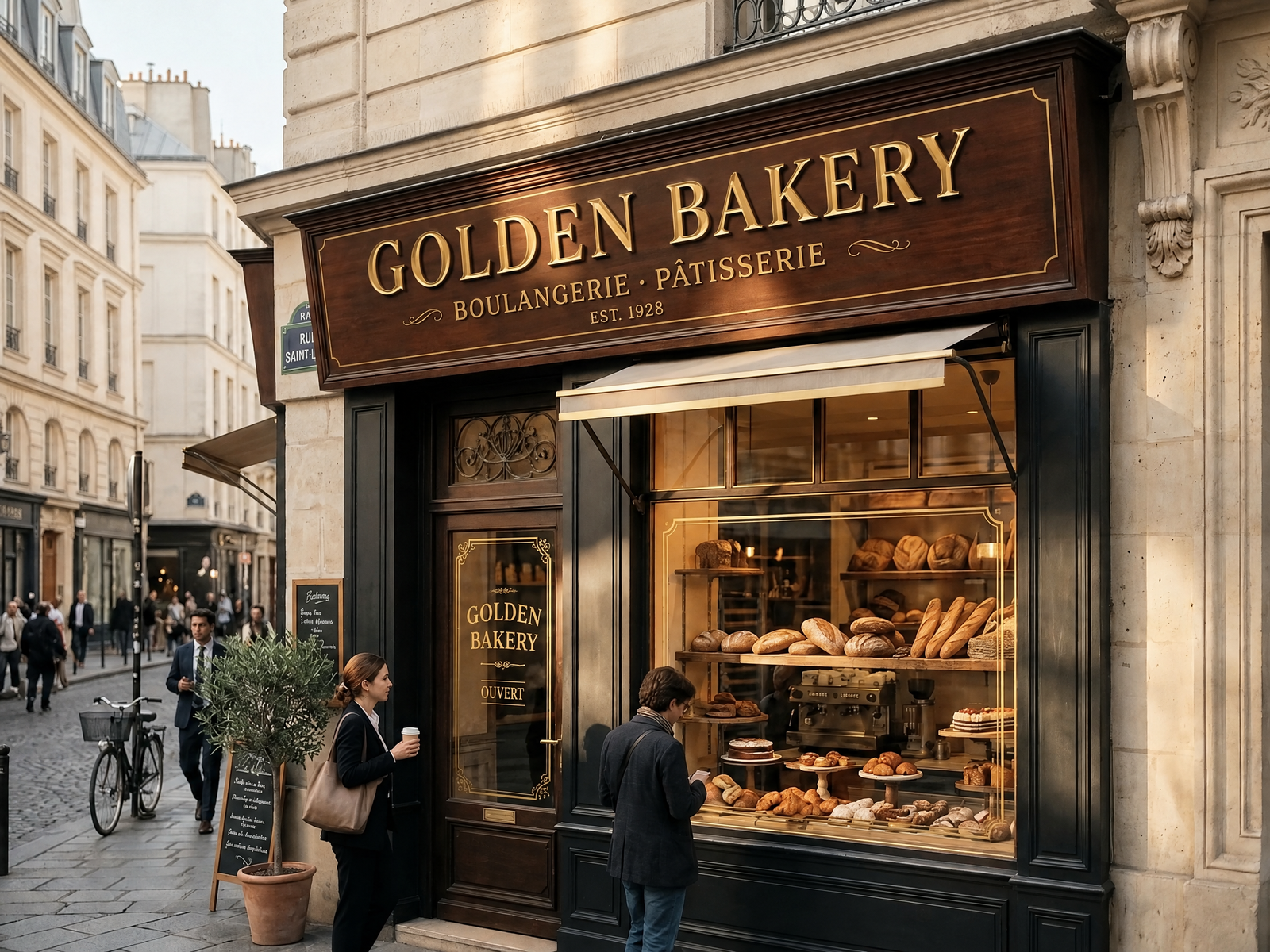
If your editing workflow demands flawless luxury typography, metallic reflections, angled street signage, or subtle paper textures, GPT Image 2.5 Flare is hands-down the best AI image editing model currently available.
Why It Leads:
- Contextual Semantic Awareness: In our storefront test (
ARTISAN COFFEE→GOLDEN BAKERY), Flare not only redesigned the main carved mahogany fascia board with matching gold leaf bevels and lighting angles, but it also autonomously detected and updated the matching translucent gold decal on the shop entrance door (ARTISAN COFFEE→GOLDEN BAKERYbelow the awning). - Speed Breakthrough in 2K Mode: Unlike GPT Image 2 which suffered from 95-second generation queues, Flare 2K clocks in at a consistent 32 to 36 seconds.
- Sub-Pixel Kerning: Maintains proper tracking and baseline alignment even when the replacement word has significantly different character counts.
Drawbacks:
- Cost: At $0.050 (¥0.36) per generation in 2K mode, unmetered free tiers will quickly drain API budgets. It is best reserved for final customer-facing deliverables and professional tier plans.
Model 2: Google Nano Banana Pro & Nano Banana 2 — Rapid Industrial Precision
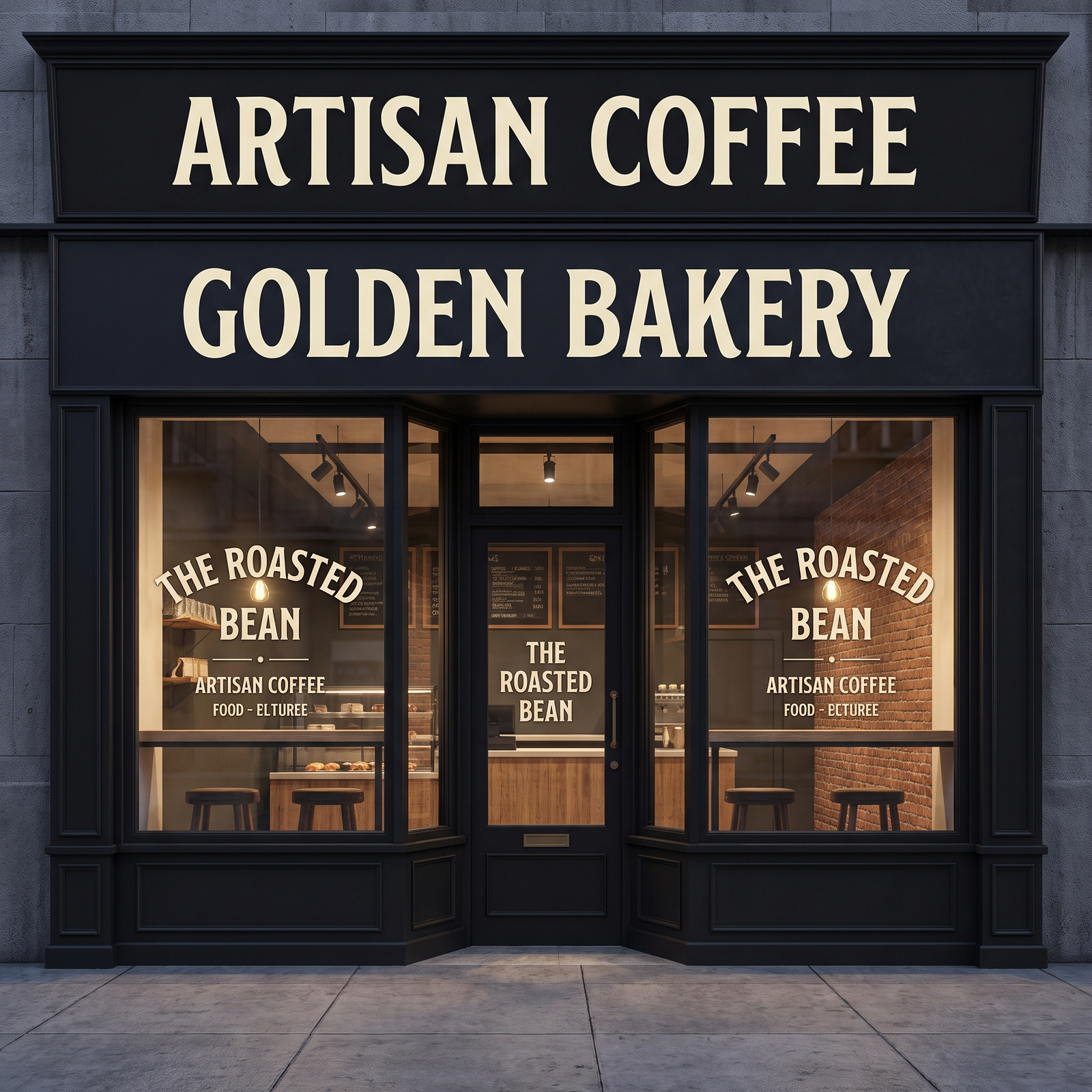
Google's Nano Banana family has emerged as one of the most widely deployed production image editing backbones.
Strengths:
- Lightning Fast Inference: Consistently returns 2K high-resolution outputs in 27 seconds.
- Vector-Like Edge Sharpness: For high-contrast modern sans-serif fonts (like Helvetica, Futura, or DIN), Nano Banana Pro delivers razor-sharp borders without typical diffusion halos or feathered edges.
- Predictable API Pricing: Sits comfortably between $0.028 and $0.040 per 2K call.
Weaknesses:
- Struggles slightly with ornate historical typography (such as 19th-century French calligraphy or complex serif swashes), where it occasionally simplifies flourish terminals.
Model 3: Grok Imagine 2.0 (Image Edit) — The High-Throughput Value King
For interactive online web tools, latency is critical. A user waiting 60+ seconds often assumes the browser has frozen.
Strengths:
- Sub-18-Second Roundtrips: Renders 1K edits in just 12 to 18 seconds.
- Extremely Low Token/Credit Cost: Costs under $0.010 per run, making it ideal for generous free trials, preview generation, and batch screenshot localization.
- Faithful Color Retention: Excellent preservation of original background chromaticity, avoiding the oversaturation drift that plagues older models.
Weaknesses:
- In complex 3D perspective scenes (extreme angles over 45°), it occasionally flattens depth gradients into standard 2D perspective warps.
Model 4: Qwen 2 Image Edit & Seedream 5 Flash

- Qwen 2 Image Edit: Exceptional for Asian typography (CJK characters), mixed English-Chinese packaging, and e-commerce product spec labels. However, its Western serif shading and specular reflection handling lag behind GPT Flare.
- Seedream 5 Flash: A balanced, budget-friendly contender. Offers generous 2K resolution at only $0.018, though it tends to introduce subtle AI smoothing on rough paper fibers and complex geometric gradient artifacts.
3. Real Scenario Benchmarks: 4 High-Stress Tests
To push these models beyond generic marketing claims, we tested four real-world stress scenarios:
Test Case A: Angled Storefront Sign with Gold 3D Lettering
- Challenge: Replace
ARTISAN COFFEEwithGOLDEN BAKERYon an angled dark mahogany signboard with direct sunlight, specular highlights, and an auxiliary glass door decal. - Results:
- GPT Image 2.5 Flare (2K): 10/10. Perfectly matched the 3D extrusion, wood varnish grain, and door decal.
- Nano Banana Pro: 8.5/10. Clean headline lettering; door decal remained partially unmodified (
OUVERTpreserved). - Grok Imagine 2.0: 8.0/10. Solid lettering and fast render, slightly simplified ambient shadow depth.
- Qwen 2: 7.5/10. Correct text, but metallic sheen lacked depth.
Test Case B: E-commerce Promo Poster Gradient Badge
- Challenge: Replace promotional discount numbers while preserving surrounding layout and ambient gradients.
- Results:
- All top models successfully replaced the numerals.
- Flare 2.5 & GPT Image 2: Retained realistic dot-matrix ink bleeds and paper creases running across the numbers.
- Seedream 5 Flash: Good numeric alignment, but smoothed out microscopic paper fiber texture around the edit box.
Test Case C: Smartphone Chat UI Timestamp
- Challenge: Change
10:00 AMto3:30 PMon a retina iOS messaging bubble. - Results:
- Nano Banana Pro and Grok excelled here due to their sharp vector-like rasterization.
- No background blur or bubble color shift detected on 1K or 2K resolutions.
Test Case D: Formal Certificate Calligraphy
- Challenge: Replace a copperplate script signature (
David Miller→Sarah Johnson) on textured parchment. - Results:
- Flare 2.5 (2K): 9.8/10. Executed graceful cursive ligatures, pen-pressure variations, and realistic dark fountain pen ink absorption in just 32 seconds.
4. Engineering the Solution: How PhotoTextEdit Combines the Best of Both Worlds
When designing PhotoTextEdit, we recognized an obvious dilemma that every SaaS creator faces:
- Using an ultra-fast budget model exclusively leaves professional designers disappointed with complex lighting and textures.
- Using Flare 2K for every single click drives operational costs sky-high and makes free tiers vulnerable to abuse.
To solve this, PhotoTextEdit implements an intelligent Dual-Engine Architecture:
User Upload & Edit Request
          │
          |-- Fast Engine (1 Credit / Grok Imagine 2.0)
          │    └── Latency: ~15s | Cost: ~$0.01 | Resolution: 1K
          │    └── Best for: Screenshots, UI mockups, memes, social graphics
          │
          |-- Pro Studio Engine (3 Credits / GPT Image 2.5 Flare 2K)
               └── Latency: ~35s | Cost: ~$0.05 | Resolution: 2K High-Fidelity
               └── Best for: Packaging, 3D retail signs, complex ad posters, print assets
Why This Matters for Users:
- Instant Gratification: Free signups get complimentary credits to test the Fast engine immediately with zero delay.
- True Pixel Precision: When you have an irreplaceable product photo or client asset, toggling Pro Mode activates GPT Image 2.5 Flare 2K for photorealistic perfection.
- No Design Experience or Font Files Required: You never need to hunt down
.ttffiles, configure Photoshop Match Font, or manually paint layer masks. The AI matches font family, stroke thickness, perspective angle, and lighting automatically.
5. Which AI Image Editing Model Should You Choose in 2026?
Depending on your specific project, here is our recommended roadmap:
- If you are building an API pipeline or internal batch tool:
- For maximum speed & lowest unit cost: Integrate Grok Imagine 2.0 or GPT Image 2 (1K).
- For premium e-commerce photo retouching: Standardize on GPT Image 2.5 Flare (2K).
- If you just need to edit an image right now without coding or Photoshop:
- Head over to the PhotoTextEdit Online Editor to test your image for free.
- For matching ornate typography styles, explore our Match Font from Image Guide.
- For cleaning up messy Midjourney or Flux outputs, use the Fix AI Text in Image Tool.
Frequently Asked Questions (FAQ)
What is the best AI model for editing text in images?
Based on our multi-scenario benchmark, GPT Image 2.5 Flare is the best overall AI model for editing text in images in 2026. It leads in typographic matching, perspective accuracy, metallic textures, and multi-location contextual text synchronization.
Can AI edit text in an image without changing the background?
Yes. Unlike early generative AI models that hallucinated completely new pictures, state-of-the-art in-place image editing models isolate the bounding text contours, inpaint the background pixels behind the letters, and re-render only the replacement text while preserving 100% of surrounding pixels.
Why do some AI models struggle with complex gradients and micro-text?
Older diffusion architectures downsample images into a low-resolution latent space (often 64×64 or 128×128 tokens), destroying micro-stroke details. Newer models like GPT Flare 2.5 and Nano Banana Pro operate with direct spatial attention at native 2K resolutions, allowing sharp letter reproduction down to small 8pt fonts.
How much does it cost to edit an image with AI?
Wholesale API generation costs range from $0.008 to $0.050 USD per image, depending on resolution (1K vs 2K) and model tier. Consumer web applications typically offer free starter credits followed by affordable pay-as-you-go credit packs starting around $4.99.